---
title: Custom Project Forms in Work Allocation
description: Your summer program, your fields. Admins now control exactly what appears on the project form.
image: https://insights.joinflo.com/hubfs/project-forms-banner-v3.png
---
[Skip to content](https://insights.joinflo.com/product-updates/custom-project-forms-in-work-allocation#main-content)
[.png?width=65&height=65&name=Frame%201%20(5).png "Flo logo")](https://www.joinflo.com/products/product-updates)
- [Sign In](https://www.joinflo.com/sign-in-to-flo)
- [Let's Talk](https://www.joinflo.com/request-demo)
# Custom Project Forms in Work Allocation

[Katherine Allen May 17, 2026](https://insights.joinflo.com/product-updates/author/katherine-allen)
- [Product Updates](https://insights.joinflo.com/product-updates/tag/product-updates)
- 3 mins
Every law firm runs its summer program a little differently, and a one-size-fits-all project form was getting in the way. Flo is the fastest shipping company in the legal talent industry, and this release is a good example of why: we heard a clear, consistent problem from recruiting teams managing summer programs, and we shipped a real fix for it.
## **The problem**
Before this release, the project form inside the Work Allocation tool was locked. Every field was there whether you needed it or not, and there was no way to add context for the people filling it out. For firms with different workflows, different data requirements, or different levels of summer associate involvement in the process, that rigidity was a real barrier. Some firms that wanted to adopt the tool were holding back specifically because of this.
Admins couldn't hide fields that weren't relevant to them, couldn't mark which fields were truly required, and had no way to leave instructions for attorneys or associates completing the form. The tool asked for compliance with a structure that wasn't theirs.
## **What we shipped**
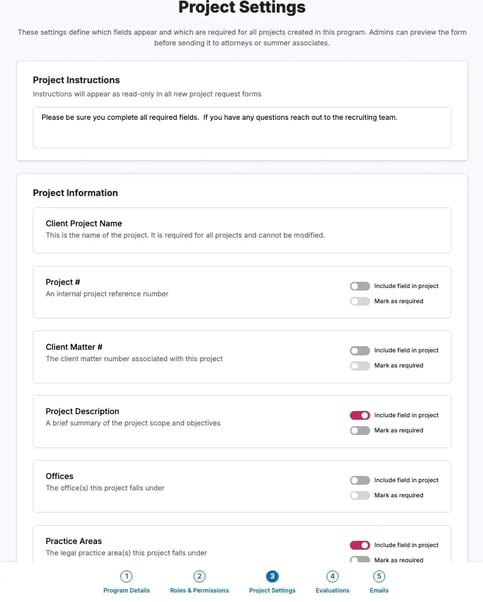
Admins now have full control over the project form through a new step in the program creation flow, called Project Settings. From there, you can:
- Add instructions to the form so that anyone completing it knows exactly what you need and why.
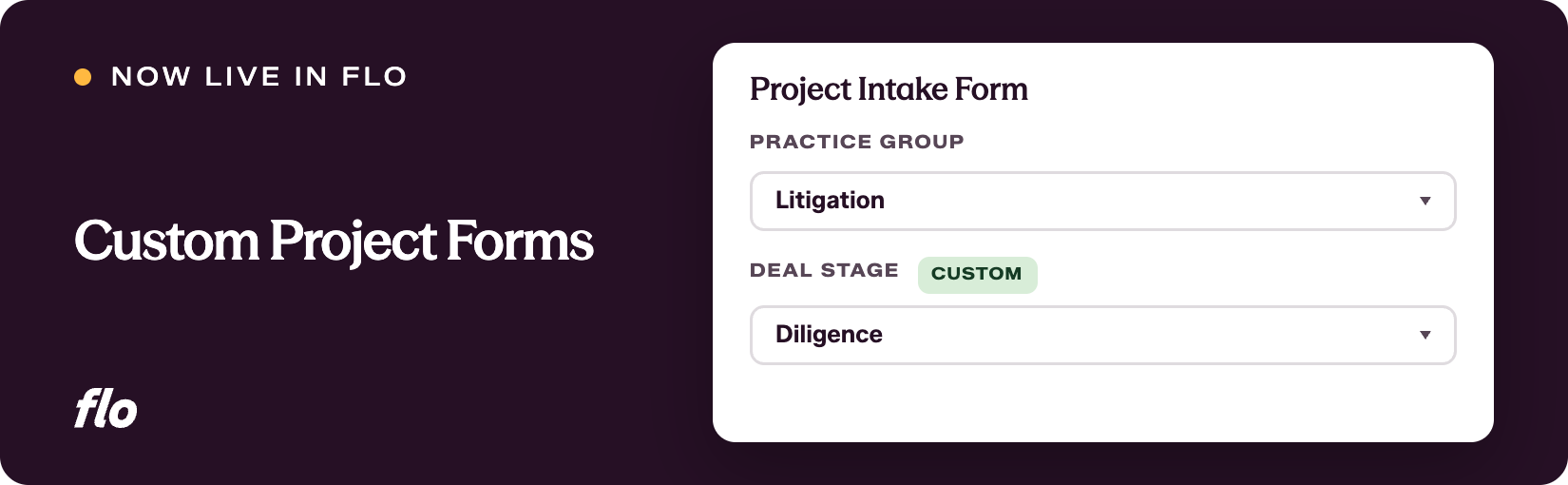
- Choose which fields appear on the form by toggling them on or off. Project name is always required and stays put, and the attorney assignment field is always present (though you can decide whether it is required or optional). Everything else is configurable.
- Mark fields as required or optional so the form enforces the data that actually matters to your program.
- Add a Comments field for free-form details that don't fit anywhere else, with the option to keep it visible only to admins and attorneys or to expose it to summer associates as well.
Whatever you configure carries through consistently. The fields you include (or exclude) are reflected on the project form itself, the project details page, the project table, and the summer associate portal. If you hide the Comments field from summer associates, they won't see it anywhere in their view.
## **Why it matters**
This change means the Work Allocation tool can actually reflect the way your program operates, not the other way around. Admins no longer have to ask people to ignore fields that don't apply. Summer associates see a clean, focused form with only what's relevant to them. Instructions built into the form reduce back-and-forth and set expectations before anyone has to ask a question.
For firms that had been evaluating the tool but hadn't made the move because the form wasn't flexible enough, that barrier is gone. You can now configure the project form to match your program before your first cohort arrives.
This one came directly from what recruiting teams were telling us, and it made a meaningful difference to what the tool can do. If there are other places in the program workflow where the structure is getting in your way, keep telling us. The more specific you are about what's slowing you down, the faster we can fix it.
If you're a Flo client and want to dig in, or you're new to Flo and curious how it works, [book a demo](https://www.joinflo.com/request-demo) and we'll walk you through it.

### Katherine Allen
Katherine Allen is the Co-Founder and CEO of Flo. Katherine is passionate about building solutions for the legal industry in collaboration with Flo’s clients, proudly partnering with 200+ law firm and law school CSOs across the U.S. and serving 10,000+ law students on Flo Recruit Forward.
[.png?width=80&height=51&name=Vector%20(1).png "Vector (1)")](http://joinflo.com)
Flo connects law firms, attorneys, agencies, and law schools — with software solutions for recruiting and performance management.
###### SOLUTIONS
- [For Law Firms](https://www.joinflo.com/solutions/law-firms)
- [For Law Schools](https://www.joinflo.com/solutions/law-schools)
- [For Students & Attorneys](https://www.joinflo.com/solutions/students-and-attorneys)
- [For Search Firms](https://www.joinflo.com/solutions/search-firms)
###### RESOURCES
- [Market Insights](https://www.joinflo.com/resources/market-insights)
- [Legal Recruiting Tracker](https://www.joinflo.com/resources/legal-recruiting-tracker)
- [Webinars & Events](https://www.joinflo.com/resources/webinars-events)
- [Case Studies](https://www.joinflo.com/resources/case-studies)
###### COMPANY
- [About](https://www.joinflo.com/company/about-flo)
- [Careers](https://www.joinflo.com/company/careers)
- [Request Demo](https://www.joinflo.com/request-demo)
- [Contact Us](https://www.joinflo.com/company/contact-us)
- [Developer Docs ↗](https://docs.joinflo.com/)
- [Help Center ↗](https://help.florecruit.com/en/)
```json
{
"@context" : "https://schema.org",
"@type" : "BlogPosting",
"author" : {
"@type" : "Person",
"name" : "Katherine Allen",
"url" : "https://insights.joinflo.com/product-updates/author/katherine-allen"
},
"dateModified" : "2026-09-13T14:25:41.867Z",
"datePublished" : "2026-05-17T01:11:35.000Z",
"headline" : "Custom Project Forms in Work Allocation",
"image" : [ "https://insights.joinflo.com/hubfs/project-forms-banner-v3.png" ],
"mainEntityOfPage" : {
"@id" : "https://insights.joinflo.com/product-updates/custom-project-forms-in-work-allocation",
"@type" : "WebPage"
},
"publisher" : {
"@type" : "Organization",
"logo" : {
"@type" : "ImageObject",
"url" : "https://insights.joinflo.com/hubfs/Frame%201%20(5).png"
},
"name" : "Flo"
}
}
```